If you’ve landed on this article, you probably already know quite a bit about email ticketing. You’re not really looking for a way to turn email into tickets – you’re looking for a tool that works for YOU. You’re looking for one that still fits your budget once you turn on automation, add the AI features you actually came here for, and scale past a handful of agents. We’ve listed nine tools in this article below and they all convert emails to tickets.
However, when you look at the pricing pages of these tools, that’s where things get slippery: six of the nine tools in this guide quote a “starting” price that doesn’t include the automation most support teams need on day one. I tested and researched all nine, priced out what they cost once the add-ons are included, and named a real limitation for each one. Read on to see what the top ones do right.
Disclaimer
Full disclosure, we evaluated ourselves in this list. After testing the other eight tools here, we’ve earned the top spot on price and Microsoft Teams support based on our analysis. That said, we’ve called out a real limitation for every tool on this list, including ours. We’ve linked to the reviews and pricing pages throughout so you can check our work and decide for yourself.
What is an email ticketing system?
An email ticketing system is a support tool that automatically converts incoming customer emails into support tickets.
Instead of managing requests inside a shared inbox (where emails get missed, duplicated, or poorly tracked), the system:
Turns each email into a ticket with a unique ID
Keeps the full conversation in one place
Lets teams assign owners, add internal notes, and track status (open, pending, resolved)
Prevents duplicate work and improves visibility
In simple terms, it helps you manage support emails like structured tasks, not messy inbox threads.
How I ranked the best email ticketing systems
To rank these tools, I focused on what actually changes your monthly bill: whether automation and AI ship at the entry price or sit behind a pricier tier, and whether Microsoft Teams support is native or missing entirely. I weighed real G2 and Capterra ratings against where each platform’s own pricing page contradicts its marketing.
A tool that gated service level agreement (SLA) management, AI, or a real Teams integration behind a paid upsell ranked lower on transparency, even with a strong base feature set.
A cheap-looking entry price that hides the features you actually need isn’t low. It’s just delayed.
All ratings are pulled from G2 and Capterra, current as of August 2026, and sourced throughout this guide, not composite scores I invented.
| App | Best for | Starting price | Key consideration |
|---|---|---|---|
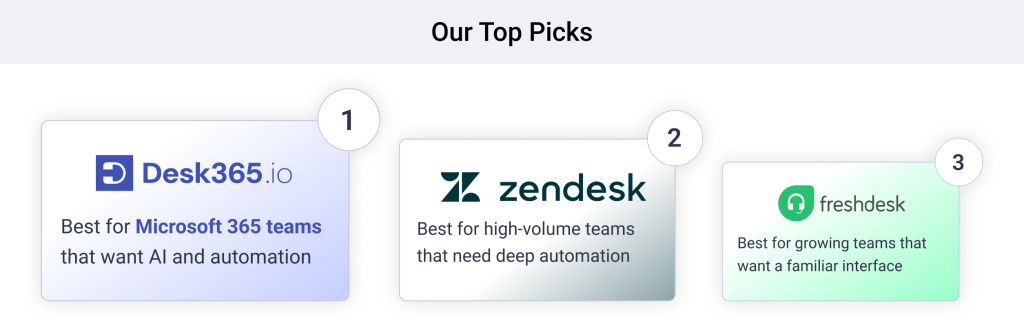
| Desk365 | Microsoft 365 teams that want AI and automation included | $12/agent/mo | Fewer native integrations than the enterprise names here |
| Zendesk | High-volume teams needing deep automation | $19/agent/mo (email only) | AI and omnichannel push the real price past $100+/agent |
| Freshdesk | Growing teams that want a familiar interface | $19/agent/mo | Freddy AI Copilot costs extra, unavailable on Growth |
| Front | Collaborative teams managing shared-inbox conversations | $25/seat/mo | Starter caps at 10 seats and one channel |
| JitBit | Small IT teams that want flat pricing | ~$29/mo flat | No native Microsoft Teams ticketing |
| Help Scout | Teams that want ticketing to feel like email | $25/user/mo | Standard-to-Plus jump nearly doubles cost |
| Hiver | Teams that live inside Gmail | $25/user/mo | Performance can lag at high email volume |
| HubSpot Service Hub | Teams that want support tied to CRM | $15/seat/mo | Professional tier adds a mandatory onboarding fee |
| Zoho Desk | Budget-conscious teams in the Zoho ecosystem | $7/agent/mo | AI (Zia) is Enterprise-only |
9 best email ticketing systems for faster customer support
1. Desk365- Best for Microsoft Teams support with AI and SLAs included, at a low price.

4.9/5

4.9/5
Why I chose Desk365 to lead this list
Desk365 converts every inbound email into a threaded ticket automatically, keeps CC’d replies and forwarded messages tied to the original conversation, and syncs replies back out as normal email, not a portal notification. It’s also the only tool here with native Microsoft Teams ticketing, and the cheapest entry price that includes email automation and AI without an add-on bill. Current pricing runs Standard $12, Plus $22, Premium $32 per agent per month, billed annually, with a lifetime free plan for three agents handling up to 50 tickets a month.
Beyond a shared support inbox, Desk365 supports web widgets and web forms as additional ticket sources, so requests from every channel land in the same threaded queue as your email. It also includes SLA management, IT asset management, security and compliance controls, a knowledge base, and custom reporting on the Plus and Premium plans. That’s the whole point: the price on the pricing page is close to the price you’ll actually pay.
Desk365 features:
- Email authentication (SPF/DKIM). Desk365 verifies sender domains through SPF and DKIM, so spoofed or altered emails don’t quietly turn into tickets and legitimate replies don’t get flagged as spam.
- Email-to-ticket conversion. Every inbound email becomes a ticket automatically, with the subject, body, attachments, and sender captured.
- Collision detection. If one agent opens a ticket to reply, a notification banner alerts other agents in real time, so nobody sends a duplicate response.
- Two-way email sync. Agents reply from inside Desk365, and the customer sees a normal email reply in their own inbox, not a portal notification.
- Unified inbox. Email, Microsoft Teams, web widget, and web form requests all land in the same shared queue instead of scattered across tools.
- Canned responses. Agents save frequently used replies as templates, with dynamic placeholders that pull in ticket and account details, and drop them into a reply in one click.
- Automation. Rules handle email routing, categorization, and round-robin or load-based assignment without an agent touching each ticket by hand.
- SLA management. Set response and resolution timers per priority level or per customer, with escalation alerts that fire before a breach happens, not after.
- AI Agent. A chatbot trained on your own knowledge base articles that resolves level-one issues on its own in the self-service portal and in Microsoft Teams, separate from AI Copilot, which drafts replies and summaries for human agents.
Pros
- Lowest price with AI included
- Deep Microsoft 365/Teams integration
Cons
- Fewer native integrations than category giants
Pricing:
Lowest Paid Plan: $12/agent/month
Highest Paid Plan: $32/agent/month
Free trial available.
2. Zendesk- Best for large support orgs with a dedicated admin.
4.4/5
4.3/5
Why I'd consider Zendesk
Support Team, its email-only plan, handles thread detection, email-to-ticket parsing, and trigger-based routing with the same automation depth Zendesk is known for at the higher tiers, and thousands of reviews holding steady at 4.3 to 4.4 is the most reassuring signal on this list.
AI Copilot costs $50 per agent per month on top of any Suite plan, so a team wanting Suite Professional plus AI pays $165 per agent before any per-resolution AI usage fees kick in. Zendesk earns its reputation, but the $19 number on the pricing page is not the number most teams end up paying.
Zendesk key features
- Email-to-ticket parsing with automatic thread matching
- Trigger-based email routing and macros
- Zendesk Explore reporting on email response and resolution times
- 1,500+ app marketplace, including inbox and CRM connectors
- Knowledge base and self-service portals
- Reporting and analytics
- Large integration marketplace
Zendesk pros
- Mature, proven at enterprise scale
- Deep reporting and routing
Zendesk cons
Often more expensive than many competitors for similar features
Can be complex to configure and maintain
- To use advanced parts, you pretty much need to be a developer
Zendesk pricing
- Support Team: $19/agent/month (email only)
- Suite Team: $55/agent/month
- Suite Growth: $89/agent/month
- Suite Professional: $115/agent/month
- Suite Enterprise + Copilot: custom quote
- Copilot add-on: $50/agent/month on any Suite plan
Learn more about Zendesk
Why I'd consider Freshdesk:
Reviewers consistently praise how cleanly it threads email conversations and how little training new agents need to work a shared inbox. Paid plans run Growth $19, Pro $55, Enterprise $89 per agent per month, billed annually, with a free plan capped at a small agent count for six months.
Freddy AI Copilot is a separate add-on at roughly $29/agent/month, and it isn’t available at all on Growth. So the $19 entry price is real for basic email ticketing, but the AI features most teams want start at Pro and cost extra on top of the seat. It’s the same pattern as Zendesk, just at a lower entry point.
Freshdesk key features
- Email-to-ticket conversion with thread detection
- Shared mailbox support for team inboxes
- Rule-based email routing and auto-assignment
- Freddy AI Copilot for drafting email replies (add-on)
What customers are saying about Freshdesk
Freshdesk pros
- Easy for new agents to learn
- Competitive Growth-tier entry price
Freshdesk cons
- Advanced features need extra setup, reporting feels limited without add-ons
- AI Copilot costs extra on top of the seat
Freshdesk pricing
- Growth: $19/agent/month
- Pro: $55/agent/month
- Enterprise: $89/agent/month
- Freddy AI Copilot add-on: ~$29/agent/month (not on Growth)
Why I'd consider Front:
It has the highest review score on this list after Desk365, and reviewers specifically call out how a shared email inbox with internal comments feels more like a real conversation than a traditional ticketing queue. Pricing runs Starter $25, Professional $65, Enterprise $105/seat/month, billed annually; Starter caps at 10 seats and a single channel, which for most teams means email only.
More than one reviewer has publicly asked for a Microsoft Teams integration, which Front doesn’t have. AI features like Copilot and Smart QA are separate add-ons (roughly $20/seat each) on Starter and Professional, and only come bundled once you’re on Enterprise. Front sells collaboration, not a complete price.
Front key features
- Shared email inbox with @mention comments on threads
- Email assignment and collision detection (no two agents reply at once)
- Rule-based email workflow automation
- Smart QA and Copilot for email replies (add-on)
What customers are saying about Front
Front pros
- Highest-rated collaboration UX here
- Clean, modern interface
Front cons
- Advanced integrations and automation can require higher-tier plans
- Starter caps at 10 seats, one channel
Front pricing
- Starter: $25/seat/month (10 seats max, 1 channel)
- Professional: $65/seat/month
- Enterprise: $105/seat/month (most AI included)
Why I'd consider JitBit:
Capterra reviewers rate it highest here for value, and its email parsing engine checks mailboxes via IMAP/POP3 or Exchange and threads replies without much configuration. The pricing is genuinely predictable in a category where most tools multiply cost by headcount. The cloud version starts around $24 to $29/month per agent; self-hosted is a one-time $1,699 license for up to 10 agents, with a year of free upgrades included.
The trade-off shows up in the same reviews: a smaller feature set and a lighter automation engine than the SaaS-first tools above it. No native Microsoft Teams ticketing here either. JitBit is honest about its price. It just isn’t chasing the same feature set as the tools around it.
JitBit key features
- IMAP/POP3 and Exchange email parsing
- Automatic thread matching to avoid duplicate tickets
- Email-based automation rules
- Self-hosted option with full source code
JitBit pros
- Most predictable pricing on this list
- Strong value per Capterra reviewers
JitBit cons
- No native Microsoft Teams ticketing
- Lighter automation than SaaS-first competitors
JitBit pricing
- Cloud (SaaS): from ~$24 to $29/month per agent
- Self-hosted: $1,699 one-time, up to 10 agents
- Self-hosted Company plan: $3,499 one-time, up to 20 agents
Why I'd consider Help Scout:
G2’s own sub-scores put it ahead of most competitors on ease of use, setup, and admin, which tracks with its reputation as the help desk whose shared inbox looks and feels like a normal email client instead of a ticketing portal. Current pricing runs Standard $25, Plus $45, Pro $75/user/month, with annual billing saving roughly 16%, plus a limited free plan for small teams.
AI Answers costs an additional $0.75 per resolution on top of the seat price. The jump from Standard to Plus nearly doubles the per-seat cost, mainly to add advanced workflows and customer relationship management (CRM) integrations. Simple to start, and the AI bill grows with your ticket volume, not your headcount.
Help Scout key features
- Email-like shared inbox, no portal for the customer
- Automatic email threading and collision detection
- Saved replies and email templates
- AI Answers for drafting email responses (add-on)
What customers are saying about Help Scout
Help Scout pros
- Rated highest here for ease of setup and admin
- Feels like a normal email reply
Help Scout cons
- G2’s aggregated cons lead with limited advanced features and thin reporting
- Standard-to-Plus jump nearly doubles cost
Help Scout pricing
- Standard: $25/user/month
- Plus: $45/user/month
- Pro: $75/user/month
- AI Answers add-on: $0.75 per resolution
Why I'd consider Hiver:
It holds one of the higher ratings on this list, and reviewers are specific about why: it turns your actual Gmail or Outlook inbox into a shared ticketing system, with no separate portal for agents to learn. Plans run Growth $25, Pro $55, Elite $85/user/month, with a two-seat minimum, and seats sell in blocks of five once you pass ten.
SLA management and customer satisfaction (CSAT) surveys are gated to Pro, and skill-based routing is Elite-only. Because seats sell in fixed blocks, a seven-person team on Pro pays for 10 seats, not seven, an effective premium over the listed per-seat price. Hiver is the right pick for a small Gmail-based team, less so once ticket volume outgrows an inbox.
Hiver key features
- Native Gmail and Outlook shared inbox (no separate app)
- Email assignment, collision alerts, and collaboration notes
- AI Compose for drafting email replies
- SLA timers on email response and resolution (Pro+)
What customers are saying about Hiver
Hiver pros
- Minimal training, lives inside Gmail
- One of the highest G2 ratings here
Hiver cons
- Seats sell in blocks of five past ten, inflating real cost
- SLAs and skill-based routing gated to pricier tiers
Hiver pricing
- Free: $0, core shared-inbox features
- Growth: $25/user/month
- Pro: $55/user/month
- Elite: $85/user/month
- Two-seat minimum on all paid plans
Why I'd consider HubSpot Service Hub:
Reviewers rate the built-in knowledge base and CRM context highly: an inbound support email auto-creates a ticket already linked to that contact’s deal history, not just a blank ticket form. It’s a real argument for teams already living in HubSpot. A free plan covers up to two users; paid tiers run Starter $15, Professional $90, Enterprise $150/seat/month, billed annually.
Professional also carries a mandatory one-time onboarding fee of $1,500, and Enterprise carries $3,500 with a 10-seat minimum. That Starter-to-Professional jump is six times the entry price, mostly to add SLA tracking and the full Help Desk workspace. The $15 headline price is the smallest number on this page, not the real one.
HubSpot Service Hub key features
- Email-to-ticket creation linked to CRM contact records
- Shared team email inbox with routing rules
- Breeze AI assistant for drafting email replies
- SLA timers on email responses (Pro+)
HubSpot Service Hub pros
- Full customer context from CRM
- Strong knowledge base reviewers highlight
HubSpot Service Hub cons
- Starter-to-Pro is a 6x price jump
- Mandatory onboarding fee at Professional and Enterprise
HubSpot Service Hub pricing
- Free: up to 2 users
- Starter: $15/seat/month
- Professional: $90/seat/month + $1,500 onboarding fee
- Enterprise: $150/seat/month + $3,500 onboarding fee, 10-seat minimum
Why I'd consider Zoho Desk:
It has the largest review base on this entire list by a wide margin, and its email-to-ticket engine handles multiple support addresses per department without much setup. Tiers run Free (up to three agents), Express $7, Standard $14, Professional $23, Enterprise $40/agent/month, billed annually.
Zia, Zoho’s AI assistant, is Enterprise-only. So Zoho Desk is genuinely the cheapest entry point on this list, right up until a team wants AI, at which point the price jumps 186% from Standard to Enterprise. Cheapest to start rarely means cheapest once you actually use it.
Zoho Desk key features
- Email-to-ticket automation across multiple addresses
- Department-based email routing rules
- Zia AI for email drafting and sentiment (Enterprise only)
- Zoho ecosystem integration for shared contact context
What customers are saying about Zoho Desk
Zoho Desk pros
- Cheapest entry price on this list
- Largest review base of any tool here
Zoho Desk cons
- Zia AI locked to the priciest tier
- Interface gets busier and more text-heavy at higher tiers
Zoho Desk pricing
- Free: up to 3 agents
- Express: $7/agent/month
- Standard: $14/agent/month
- Professional: $23/agent/month
- Enterprise: $40/agent/month (includes Zia AI)
What are the must-have features of an email ticketing system?
- Email-to-ticket conversion. Converts incoming emails into tickets automatically, capturing subject, body, attachments, sender, and a unique ticket ID.
- Two-way email sync. Agents reply from inside the helpdesk; the customer gets it as a normal email in their own inbox, not a portal link.
- Email threading and duplicate detection. Repeated emails and CC’d replies merge into one ticket instead of splintering into new ones.
- Shared mailbox support. Multiple agents can work the same support@ address without stepping on each other’s replies.
- Ticket assignment and ownership. Manual or rule-based routing by keyword, sender, or category, with clear ownership.
- Status and SLA tracking. Open/pending/resolved states, with escalation timers on the ones that matter.
- Internal notes. Agent-only context on a ticket that customers never see.
- Canned responses. Saved replies with variables like customer name or ticket number.
- Automation rules. Auto-tagging, auto-priority, and routing without a human touching every ticket.
- Reporting. Response and resolution time, volume trends, and agent performance.
Frequently asked questions
When a customer sends an email to your support address, the system automatically creates a ticket, captures the full message and attachments, and assigns it a ticket ID. Any follow-up replies are added to the same ticket thread.
Yes. Good ticketing systems detect repeated conversations and keep follow-ups in the same ticket. Many platforms also allow merging similar tickets to eliminate duplicates.
Zoho Desk has the lowest entry price at $7 per agent per month. Desk365 offers the lowest price that includes AI and automation without a separate add-on, at $12 per agent per month.
Desk365 is the only tool on this list with native Microsoft Teams ticketing, letting agents and customers create and manage tickets from inside Teams instead of through a bolted-on integration.
Most tools use assignment locks or collision detection: once an agent opens or starts replying to a ticket, the system flags it as in progress so a second agent sees that status before sending a duplicate reply. Front, Help Scout, and Hiver build this directly into the shared inbox view; Desk365, Freshdesk, and Zendesk handle it through ticket assignment and status rather than a live collision alert.





 AI Agent
 Asset Management
 Knowledge Base
 Automations
 SLAs
SLAs
 Customization
 Ticket Assignment
 Reports & Analytics
 Approval Management
 Helpdesk Security
 Explore All Features
 Banking and Finance
 Healthcare
 MSP
MSP Government
  Non Profit
 IT Services
 Customer Support
 Human Resources
 Facilities